
Olympic Games Tokyo 2020: Compete in Multiple Sports With Friends
Anúncios
Playing the Olympic Games Tokyo 2020 official video game lets you and your friends dive straight into intense, arcade-style sporting action from the comfort of your living room couch.
Gathering friends for a gaming session becomes an unforgettable experience when you challenge them across various global disciplines.
This title completely bypasses the stiff, hyper-realistic simulation style seen in modern sports games, opting instead for pure, unadulterated party fun that favors quick reflexes over complex strategy.
It is an approach that makes the competitive environment accessible to absolutely everyone in the room, regardless of their gaming experience.
This technical guide breaks down the best cooperative modes, platform availability, and optimized game settings to help you maximize your multiplayer experience.
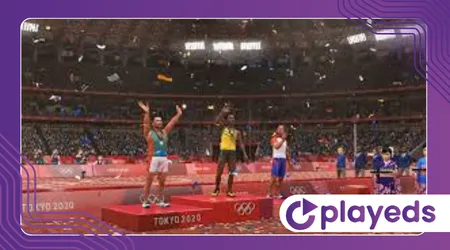
Discover how to build your ultimate athletic squad and dominate the podium efficiently. By understanding the core mechanics and interface quirks, you can transform a casual game night into a high-stakes digital tournament.
We will explore everything from localized latency management to hidden tactical advantages within the game’s simplified control schemes.
Table of Contents
- What Is Olympic Games Tokyo 2020: The Official Video Game?
- How Does the Multiplayer Mode Work with Friends?
- Which Sports Support Local and Online Co-op?
- Why Are the Customization Options Ideal for Group Play?
- Technical Specifications and Real Performance Metrics
- Reflective Summary on the Game’s Legacy
- Frequently Asked Questions (FAQ)
What Is Olympic Games Tokyo 2020: The Official Video Game?
Sega developed and published this official sports title to capture the immense excitement of global competition through accessible, fun-filled, and fast-paced arcade gameplay mechanics.
The global launch occurred in June 2021, bringing high-energy physical simulation to multiple modern gaming hardware systems simultaneously.
It stands as a fascinating cultural snapshot, capturing an event that faced unprecedented real-world delays, yet found a vibrant, permanent life within the digital realm.
The game consciously avoids the dry, corporate atmosphere of traditional sports simulations, injecting vibrant color palettes and over-the-top animations into every single event.
Gamers can experience 18 distinct sporting events ranging from traditional track and field to modern team sports. The design minimizes steep learning curves, allowing casual and hardcore players to enjoy quick matches without mastering overly complex controller layouts.
This deliberate simplicity is where the game truly shines, as a newcomer can pick up a controller and immediately challenge a seasoned veteran in a 100-meter dash.
However, beneath this accessible surface lies a subtle layer of timing-based mechanics that rewards precise execution and rhythmic button presses.
You can learn more about historical event details directly via the official International Olympic Committee website.
How Does the Multiplayer Mode Work with Friends?
Connecting with your friends in the Olympic Games Tokyo 2020 video game is incredibly straightforward, supporting both local couch cooperative play and expansive online matchups.
Local split-screen multiplayer accommodates up to two players for intense head-to-head battles on a single console. There is an undeniable charm to this classic arrangement, where trash-talking your opponent sitting right next to you becomes a core part of the gameplay experience.
The split-screen rendering is flawlessly optimized, ensuring that neither player suffers from visual degradation or sudden drops in frame rate during crucial, split-second actions.
Online matchmaking expands the competitive field significantly, allowing groups of two to eight players to gather in private lobbies.
You can host custom tournaments, track individual podium finishes, and compete together against global teams on the international leaderboards.
This online infrastructure utilizes structured lobby codes, making it remarkably easy to coordinate sessions across different households.
++ Sports Champions VR: Feel the Thrill of Virtual Reality Sports Challenges
The netcode handles geographical distances surprisingly well, though maintaining a stable, wired connection is always recommended to ensure that input latency does not steal a gold medal from your grasp during razor-thin finishes.
Which Sports Support Local and Online Co-op?
Every single event included in the official Olympic Games Tokyo 2020 package features robust multiplayer functionality, though the specific player layouts vary depending on the chosen discipline.
High-speed track events like the 100m sprint put players in parallel lanes for pure speed challenges. These button-mashing events are brilliant for brief, high-energy bursts of competition, demanding raw physical speed from your fingers.
They serve as excellent icebreakers for a group session, establishing an immediate competitive hierarchy before moving on to more complex, strategy-driven team events.
Team sports like basketball, football, and beach volleyball allow you to partner up directly with your friends against challenging computer opponents.
This shifts the dynamic from fierce rivalry to genuine coordination, requiring players to communicate passes, defensive positioning, and shooting windows in real time.
Precision-based events, including table tennis and tennis, offer both singles showdowns and dynamic doubles cooperative matches.
Read more: iRacing: Join Online Leagues and Compete in Realistic Racing Simulations
The physics engines in these racket sports are intentionally exaggerated, allowing for massive top-spin maneuvers and dramatic, arcading smashes that keep everyone on the edge of their seats.
Why Are the Customization Options Ideal for Group Play?
Unlocking creative freedom makes your casual multiplayer sessions much more entertaining, as the built-in avatar creator lets players design completely unique digital athletes.
You can choose standard athletic uniforms or select hilarious outfits like pirate suits, astronaut gear, or cowboy clothing. There is an incredible sense of absurdity when a player dressed in a full Sonic the Hedgehog mascot costume lines up on the starting blocks next to an astronaut.
This visual humor breaks the tension of serious competition, transforming the game into an incredibly lighthearted social experience.
Sharing your unique Avatar Creation Codes with friends allows you to assemble a visually unified, highly eccentric dream team. These customized stats and appearances carry over flawlessly into both local matches and competitive online ranked modes.
This means the bizarre character you spent an hour tweaking on your home console can be deployed instantly during an online tournament, preserving your personal brand across the digital space.
++ Alan Wake Remastered: Face the Darkness with Light and Courage
The progression system rewards continuous play by unlocking even more ridiculous cosmetic items, giving your gaming group a constant incentive to return for another round of competition.
Technical Specifications and Real Performance Metrics
Optimizing your system ensures smooth frame rates during local split-screen gaming sessions, preventing input lag from ruining your crucial medal-winning performances.
The software utilizes Sega’s proprietary Hedgehog Engine 2 to deliver vibrant visuals and responsive 60 frames-per-second gameplay.
This engine is highly praised for its ability to handle complex lighting and multiple character models simultaneously without stuttering.
When multiple players are inputs commands at the exact same millisecond, the engine’s internal polling rate guarantees that every single action is recorded with pixel-perfect accuracy.
Review the official PC hardware configuration metrics below to guarantee an optimal multiplayer experience for your gaming group:
| Hardware Component | Minimum PC Requirements | Recommended PC Specs | Xbox / PlayStation Status |
| Operating System | Windows 10 (64-bit) | Windows 10 (64-bit) | System Software Updated |
| Processor (CPU) | Intel Core i5-2300 | Intel Core i7-3770 | Native Architecture |
| Memory (RAM) | 4 GB RAM | 6 GB RAM | Shared Console Memory |
| Graphics (GPU) | NVIDIA GeForce GTS 450 | NVIDIA GeForce GTX 660 | 4K Ultra HD Enabled |
| Storage Space | 15 GB Available | 15 GB Available | Solid State Drive Preferred |
Reflective Summary on the Game’s Legacy
Mastering the Olympic Games Tokyo 2020 video game with your friends provides a perfect blend of nostalgic arcade fun and genuine mechanical skill.
The balanced variety of 18 sports ensures that every player in your group will find a discipline they can dominate.
It stands out as an exceptional party game precisely because it refuses to take itself too seriously, prioritizing pure entertainment value over the grueling, repetitive training loops found in more realistic sports titles.
It acts as a digital playground where anyone can become an elite athlete within a matter of minutes.
While Sega officially delisted the digital version from primary storefronts in early 2026, physical discs and existing library copies remain completely playable.
This shift into a legacy title means that physical copies are highly sought after by collectors and party-game enthusiasts alike. Gather your friends, customize your wild athletes, and claim your virtual gold medals today!
The enduring appeal of this game lies in its ability to bring people together, creating lasting memories of dramatic, last-second victories and hilarious athletic mishaps in equal measure.
For detailed patches, technical discussions, and legacy community updates, check out the dedicated Sega Support Portal.

Frequently Asked Questions
Can I play the Olympic Games Tokyo 2020 game cross-platform with friends?
No, the game does not support cross-platform multiplayer between different consoles, meaning you and your friends must utilize the same gaming ecosystem to compete online.
How many players can join a local couch multiplayer match?
Local multiplayer supports up to two players simultaneously on a shared screen, while online lobbies expand the total player capacity up to eight participants.
Are all 18 sporting events available for multiplayer modes right from the start?
Yes, every single sporting event is unlocked immediately upon launching the game, allowing your group to jump directly into any competition without tedious unlocking requirements.
Does the game feature any automated catch-up mechanics for weaker players?
While there are no direct handicap toggles, the arcade nature of the controls naturally keeps matches close, allowing less experienced players to stay competitive through intuitive mechanics.
Can I save custom tournament playlists for future gaming sessions?
Yes, the software allows you to create and save customized event line-ups, making it incredibly easy to relaunch your group’s favorite sports without manual reconfiguration every time.
++ How to Play Local Multiplayer on Olympic Games Tokyo 2020
++ Tokyo 2020 Facts and figures
